

Buying a TV for a child's bedroom is easier if you check the controls before the screen size. Look for built-in parental controls, a volume limit, a way to manage the TV from your phone, and a safe way to mount or stand it. Most of this you can check in the shop or in the product listing, in a few minutes.
Christmas and birthdays are the peak time for new TVs and consoles, and children often ask for one: in a TV retailer's survey, 75% of parents said their child had asked for a TV in their room. This guide does not recommend any model or price. It is a checklist of what to look for, whichever brand you choose.
First, decide whether it should go in the bedroom
It is worth a minute before you buy. Health bodies such as the American Academy of Pediatrics advise keeping TVs out of bedrooms, and a study in Pediatrics of 2,048 children aged 9 to 13 linked a bedroom TV to 18 fewer minutes of sleep a night. That is a link, not proof, and plenty of families make it work with clear rules.
Our guide on whether your child should have a TV in their bedroom covers the age question and the rules to agree first. Everything below assumes you have decided yes.
What to check before you buy
| Check | Why it matters | What to look for |
|---|---|---|
| Built-in parental controls | Locks for apps, channels and age ratings are the first line of defence | PIN locks on channels, apps and age ratings |
| Time controls | Stops the TV being on all night | A viewing time window, or a way to schedule it from a phone |
| Volume limit | Protects hearing and stops the volume waking the house | A maximum volume you can set, ideally one the child cannot change |
| Phone app control | Lets you manage the TV without going upstairs | A parent app that works with that brand of TV |
| Size and position | A TV that is too big for the room invites late-night viewing from the bed | A size that suits the distance from where they sit |
| Safe mounting | A falling TV is a real hazard, especially for younger children | A wall bracket rated for the TV, or a stable stand |
| Ports and consoles | Consoles bring long sessions and heat | Enough HDMI ports, and space around the vents |
Parental controls and Family Settings
Most smart TVs have some parental controls, but they differ by brand and are often buried in menus. In a survey by Virgin Media O2 and Internet Matters, 44% of parents did not know how to switch on safety settings, and more than half knew controls existed but fewer than a third used them. So choose a TV where you will actually find and use them.
Newer LG TVs (webOS 22 and later) have Family Settings. According to LG's help pages, they include a viewing time window, with a password needed outside it, a volume limit, and a daily and weekly screen-time report by app. They are set up on the TV itself, using the remote. LG also has PIN locks for channels, apps and age ratings. If you are looking at an LG, check the model's webOS version before you buy. We compare the two approaches in our guide to LG Family Settings and TV Parent, and the full list of options is in how to set parental controls on an LG TV.
Remember that a TV's controls cover the TV, not everything plugged into it. A console or an HDMI stick has its own settings. And a phone, tablet or laptop is outside the TV's controls altogether.
Volume
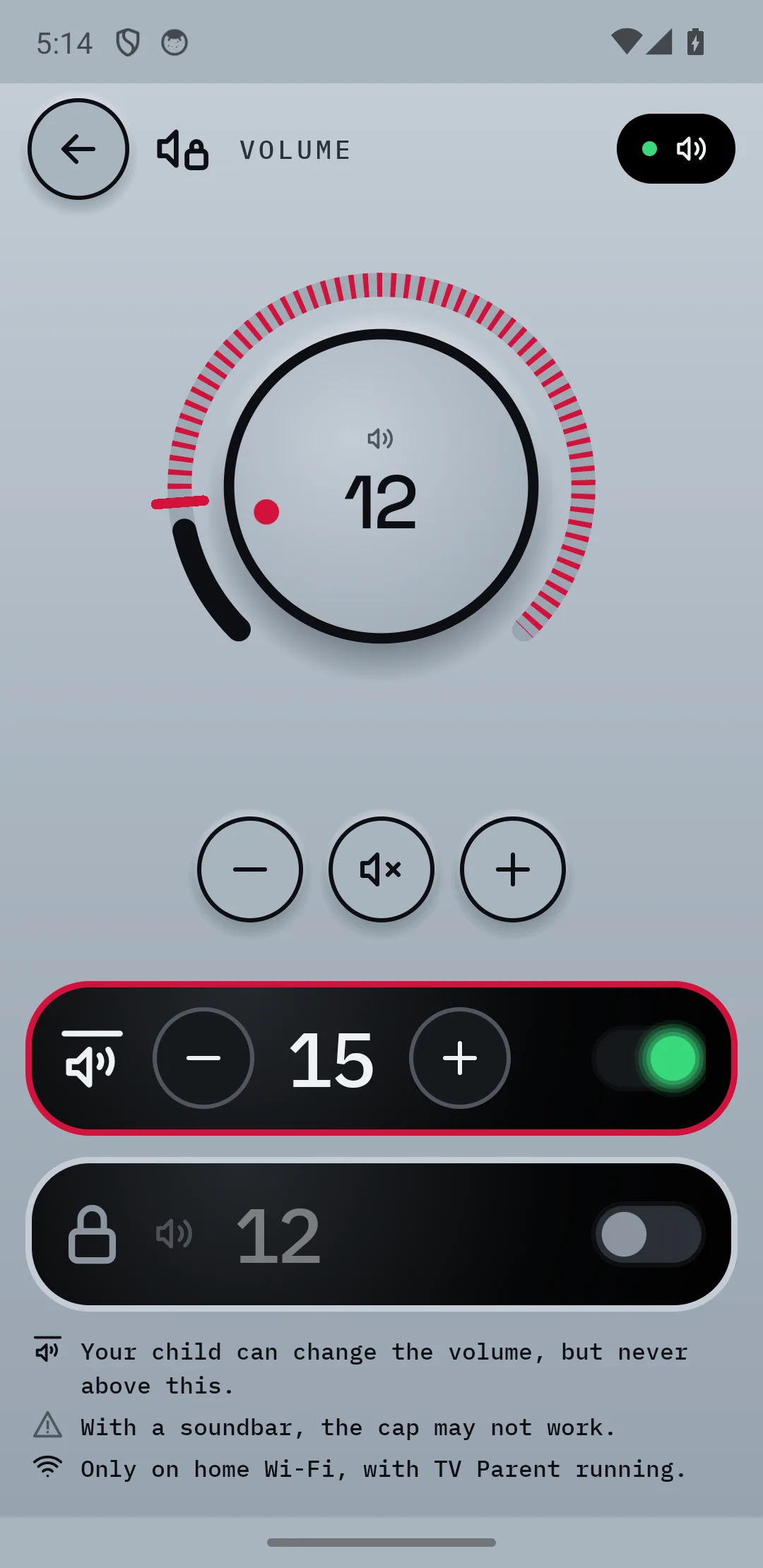
Too-loud sound is a safety point as well as an annoyance, especially with headsets. A volume limit, set by you and not changeable by your child, is worth having. It also stops late-night viewing from carrying through the house.
Managing it from your phone
Settings you can only change on the TV tend not to get changed. If the TV is upstairs and the remote is in your child's room, you will not pop up to adjust a limit. A phone app lets you lock, mute or switch the TV off without a trip upstairs. Check that the app works with the brand you are buying. TV Parent, for example, works only with LG webOS TVs.
Size and position
Bigger is not better in a bedroom. A very large screen close to the bed is more tempting and harder to ignore. Pick a size that suits the room, and think about where the child will sit to watch. If possible, place it where you can see the screen when you open the door.
Mounting and anti-tip safety
TVs falling on young children is a real safety concern. Whichever way you go:
- Use a wall bracket rated for the TV's weight and screen size, and follow the fixing instructions for your wall type.
- If it sits on furniture, use a unit made to hold a TV, and anchor the TV and furniture as the manufacturer advises.
- Keep cables tidy and out of reach, since trailing cables are a trip hazard.
- Leave space around the TV and any console so the vents are not blocked, as consoles can overheat.
If you are unsure about fixing to a wall, ask a qualified installer.
If you are also buying a console
Consoles and TVs are often given together, and the console is where the longest sessions happen. Psychiatrists at Mayo Clinic, Stanford and UCLA suggest keeping consoles out of the bedroom at night and stopping gaming 1 to 2 hours before bed. Agree session lengths with your child first, and ask yourself whether the console could live in a shared room instead.
Be aware that controls on the TV do not cover a console. TV Parent, for instance, cannot control a console itself. It can only manage the TV's HDMI input, which you can set to ask first or block.
How TV Parent helps
TV Parent is an Android app for LG webOS TVs, coming soon to Google Play. If you are buying an LG, it gives you the phone control that many TVs lack.
- Lock the TV from your phone with a message such as "Homework time", and unlock it with your PIN.
- Hold the volume at a level you choose, so it cannot be turned up.
- Set a schedule for school nights and weekends.
- Let your child ask first for the HDMI input or more time, and decide from your phone.
- See what is on without going upstairs.
It has limits. It needs an LG webOS TV and an Android phone, and the phone and TV must be on the same home Wi-Fi (it does not work when you are out yet). It cannot stop phones, tablets or laptops. See the pricing section: Free, Pro at £9.99 once, or Plus at £2.99 a month or £24.99 a year, with 7 days of Plus free.
Common questions
What should I look for when buying a TV for a child's room?
Look for parental controls you will actually use, a volume limit, a time window or schedule, and a way to manage the TV from your phone. Then check the size, the mounting and the ports. Brand and price come after those.
Does an LG TV have parental controls?
Yes. Newer LG TVs (webOS 22 and later) have Family Settings, with a viewing time window, a volume limit and a screen-time report, set up on the TV. LG also has PIN locks for channels, apps and age ratings. Check your exact model's help page to see which it has.
Is it safe to put a TV on a chest of drawers?
Only if the furniture is made to hold a TV and the TV is secured as the manufacturer advises. A wall bracket rated for the TV is usually the more secure option. If you are not sure, ask a qualified installer.
Do I need a smart TV for a child's room?
Not necessarily. A smart TV adds apps, YouTube and a browser, which are the things most parents want to control. A simpler TV has fewer ways in, but also fewer controls for what it does have. Decide which you can manage.
Sources
- Reliant survey on children asking for a bedroom TV
- PsyPost on the Pediatrics study of bedroom TVs and sleep
- NBC News on American Academy of Pediatrics guidance
- ISPreview on Virgin Media O2 and parental controls
- Internet Matters research tracker on parental controls
- LG Family Settings help page
- LG Family Care (webOS 22) help page
- Mayo Clinic on managing gaming